
Searching for the Talaxy login should be simple. In reality, it’s one of the most misunderstood school portal logins in the UK.
Parents reset passwords that never change. Students swear their credentials are correct. Apps load blank screens. And everyone assumes Talaxy is broken.
It usually isn’t.
Tasc Software built Talaxy as a modular school platform, rather than a single universal login system. In 2026, most schools control Talaxy access through Single Sign-On (SSO) using Microsoft or Google. That means the “front door” looks different depending on who you are and which school you belong to.
This guide breaks down how Talaxy actually works in 2026, shows you the correct login path, and explains how to fix the most common login problems — without guesswork or wasted resets.
What Is Talaxy (And Why Login Is Confusing)
Talaxy is a school-to-home communication platform used by UK secondary schools to manage:
-
Attendance and punctuality
-
Behaviour and rewards
-
Timetables and homework
-
School announcements
-
Parent-teacher communication
The confusion starts because Talaxy itself does not manage most passwords.
Instead, schools decide:
-
Who can log in (parent priority rules)
-
Which identity provider is used
-
How parent and student access is separated
As of 2026, this has become more pronounced, not less.
Talaxy Login: What Most Users Actually Want
If you searched for Talaxy login, your goal is likely one of these:
-
Get into the parent portal
-
Access Talaxy as a student
-
Fix a login that suddenly stopped working
-
Understand why the app works differently from the website
This guide addresses all four.
Talaxy Login: Choose the Correct Access Path
Before trying anything else, identify who you are.
Talaxy Login Decision Framework
| You are… | Correct login route |
|---|---|
| Parent / Guardian | Talaxy Parent Portal |
| Student | School-managed Talaxy login |
| Mobile user | Talaxy App (via school search) |
Using the wrong path is the #1 reason Talaxy logins fail.
Talaxy Parent Login (Most Common Case)
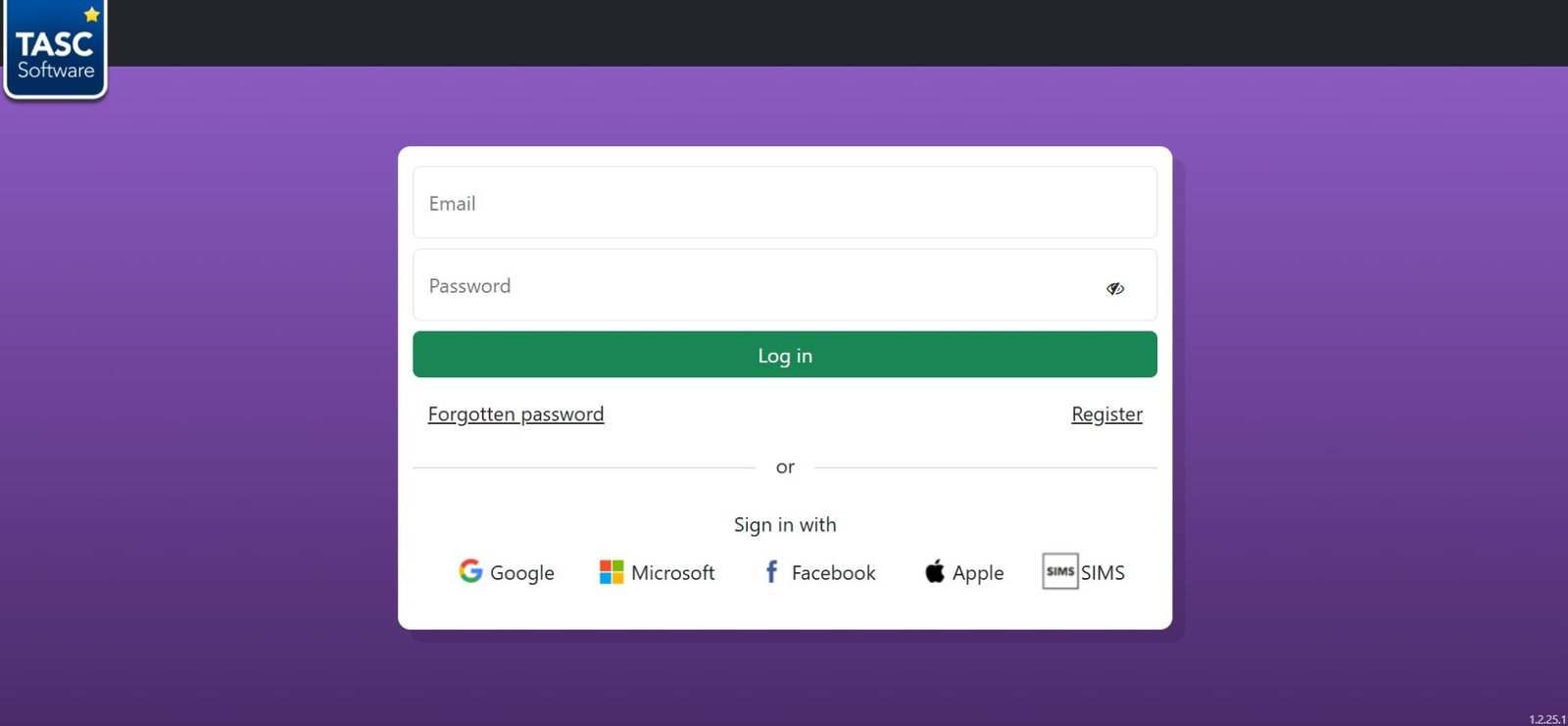
How Parents Log In (2026)
-
Visit your school’s official website
-
Click the Talaxy Parent Portal link
-
You’ll be redirected to a URL like:
schoolname.talaxy.app -
Log in using the email address provided on your child’s admission form
🔐 Important:
Parents do not use student credentials, even if the email looks similar.
Parent Login Issues Explained
If you see “Account not found”, it usually means:
-
The school has a different email on record
-
You’re listed as Priority 2, not Priority 1
-
The school hasn’t activated your account yet
Resetting passwords on Talaxy’s main site will not fix this.
Talaxy Student Login Explained
Students rarely log in through a public Talaxy page.
Student Login Rules (2026)
-
Login is controlled by the school’s identity system
-
Most schools use Microsoft Entra ID or Google Workspace
-
Your Talaxy password = your school email password
If you see “Invalid credentials”, the issue is usually:
-
You’re logged into a personal Gmail/Outlook account
-
Your school password has expired
-
Your account is temporarily locked by the school’s IT
Talaxy App Login (iOS & Android)
The Talaxy app does not bypass school login rules.
How the App Works Now
-
Install or update the Talaxy app
-
Search for your school
-
You’ll be redirected to the same login system the school uses
-
Log in as a parent or student
📱 2026 Update: The app now requires a school search step. Older app versions often fail newer SSO security checks.
The #1 Cause of Talaxy Login Failure: The “Generic Login” Trap
Many users Google “Talaxy login” and attempt to sign in at talaxy.app.
This often fails because:
-
Talaxy doesn’t know which school database to use
-
SSO authentication requires a school-specific URL
✔️ Always start from your school’s website.
This ensures you land on the correct [schoolname].talaxy.app domain.
Also Read: How to Update ETSJavaApp by eTrueSports in 2026 (Fix Crashes & Missing Features)
Fact Check: Talaxy Login Technical Reality (2026)
| Area | Status | What’s Actually Happening |
|---|---|---|
| Identity Providers | Verified | Most schools use Microsoft Entra ID or Google Workspace |
| URL Structure | Verified | School-specific Talaxy subdomains are standard |
| Parent vs Student Access | Verified | Completely separate login systems |
| App Sync | Verified | Updated apps required for modern SSO |
“Bugs” That Are Actually School Rules
The Dual Parent Rule
Some schools only activate Talaxy for the Priority 1 contact.
If you’re Priority 2 and can’t log in, this is a school configuration, not a Talaxy error.
The Homework Lock
In some setups, overdue digital homework can limit what parents see — particularly behaviour data — until it’s acknowledged.
This feels like missing data, but it’s intentional.
Talaxy Login Troubleshooting Checklist
Follow this before contacting support:
-
✅ Confirm your role (parent vs student)
-
✅ Start from the school website
-
✅ Check the email matches school records
-
✅ Use Incognito mode or clear cache
-
✅ Log out of personal Google/Microsoft accounts
-
✅ Update the Talaxy app
-
✅ Try browser login if the app fails
Talaxy Login Decision Matrix (Quick Fix Guide)
| Situation | Likely Cause | Fix |
|---|---|---|
| “Account not found” (Parent) | Email mismatch | Contact school office |
| “Invalid credentials” (Student) | Wrong Google/Microsoft account | Log in with school email |
| Blank white screen | Session cookie conflict | Clear cache or Incognito |
| App won’t load | Outdated app | Update + reselect school |
Why Talaxy Login Issues Are Increasing (2026 Insight)
Schools are prioritizing:
-
Stronger data protection
-
Centralized identity management
-
Reduced password duplication
Security has improved — but navigation hasn’t kept up. That’s why clear login guidance now matters more than ever.
FAQs
Q. How do I log in to Talaxy?
Go to your school’s website, click the Talaxy link, and log in as a parent or student using the credentials the school manages.
Q. Is the Talaxy login the same for parents and students?
No. Parents and students use separate access systems.
Q. Why doesn’t the password reset work on Talaxy?
Most passwords are managed by the school’s Microsoft or Google system.
Q. Can I use Talaxy without the app?
Yes. The web portal offers full functionality.
Q. Why does Talaxy work on one device but not another?
Cached login sessions and SSO conflicts are common. Clearing cache usually resolves it.
Conclusion: The One Rule That Solves Most Talaxy Login Problems
Talaxy isn’t broken — it’s school-controlled.
If you remember one thing:
Always start from your school’s official Talaxy link.
Doing that ensures:
-
Correct database routing
-
Proper SSO authentication
-
Fewer login errors
Once you understand how Talaxy login works in 2026, the frustration disappears.
Related: Best Family Tree Software: Organize Your Genealogy Easily

