
If you searched for mozillod5.2f5 loading issues, you’re probably dealing with a slow browser, pages that won’t load, or unexplained performance problems. What makes this situation confusing is the strange name itself—it sounds technical, official, and serious.
Here’s the truth upfront:
“mozillod5.2f5” is not a real Mozilla product, error code, browser version, or software component.
It does not exist in Firefox documentation, Mozilla source code, cybersecurity databases, or legitimate technical references.
This article explains why the term exists at all, what’s actually causing the loading problems users associate with it, and—most importantly—how to fix browser performance issues safely without falling into malware traps.
What is “mozillod5.2f5”? (Verified Answer)
There is no such thing as mozillod5.2f5 in any official or authoritative source.
-
Not a Firefox release
-
Not a Mozilla service
-
Not a known malware family
-
Not an error code
-
Not a system file
The term is a synthetic or “ghost” keyword—a random string that has been treated as if it were real by low-quality websites and automated content systems.
Its presence online does not mean it represents a real technical issue.
Why Does This Fake Term Appear in Search Results?
This is a known pattern in modern search ecosystems.
How “Ghost Errors” Are Created
-
A random string appears
-
In a URL
-
In a log file
-
In the page source
-
In a misleading pop-up or redirect
-
-
SEO pages are generated around it
-
The term is framed as a “new issue.”
-
Generic browser advice is attached
-
No real evidence is provided
-
-
Search results become self-referential
-
Articles cite each other
-
The illusion of legitimacy grows
-
-
Users are exposed to risk
-
Fake “fixer” tools
-
Rogue optimizers
-
Affiliate-driven antivirus downloads
-
The keyword exists because content was created, not because a real problem exists.
Also Check: Problem on Llekomiss Software? Causes, Fixes & Quick Solutions (2025)
Important Safety Warning
If you see any software claiming to fix:
-
“mozillod5.2f5”
-
“d5.2f5 browser error”
-
“mozillod performance issue”
Do not download it.
Tools that target fake or undefined errors are commonly:
-
Rogue optimizers
-
Adware
-
Trojan installers
The name is bait. The download is the threat.
So, Why Is Your Browser Actually Slow?
Users who encounter this term are almost always experiencing normal browser performance problems, such as:
-
Corrupted or overloaded browser cache
-
Conflicting or malicious extensions
-
Weak or unstable internet connection
-
Outdated browser versions
-
Background processes are consuming resources
-
Malware unrelated to the fake name
The issue is real.
The label is not.
Safe, Legitimate Ways to Fix Browser Loading Issues (2025)
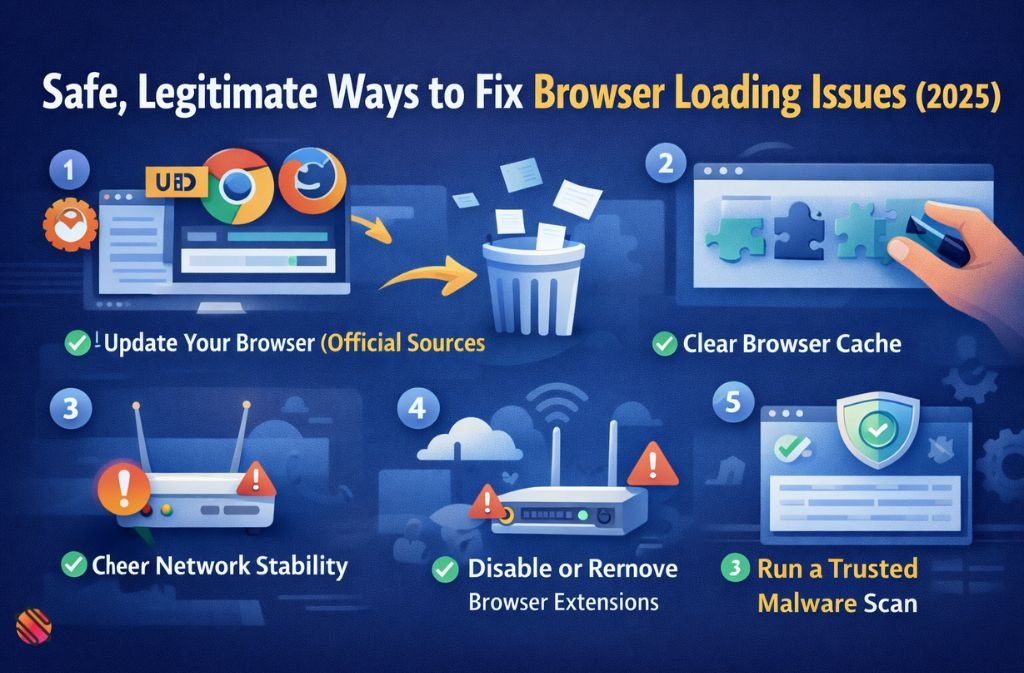
1. Update Your Browser (Official Sources Only)
Outdated browsers frequently cause:
-
Loading delays
-
Compatibility issues
-
Security vulnerabilities
Always update directly through the browser’s settings or the official website.
2. Clear Browser Cache and Site Data
Cached files can become corrupted and prevent pages from loading correctly.
Clearing the cache often results in:
-
Faster load times
-
Fewer rendering errors
-
Improved stability
This is one of the most effective fixes for generic loading problems.
3. Disable or Remove Browser Extensions
Extensions are the number one cause of unexplained browser slowdowns.
Pay special attention to:
-
Extensions you don’t remember installing
-
Free tools bundled with downloads
-
Extensions with broad permissions
Disable all extensions first, then re-enable only the ones you trust.
4. Check Network Stability
Slow or unstable internet connections often look like software errors.
Try:
-
Restarting your modem/router
-
Switching networks temporarily
-
Testing on another device
Weak Wi-Fi frequently causes page loading failures.
5. Run a Trusted Malware Scan
If performance issues persist, scan your system using:
-
Built-in operating system security tools
-
Well-established antivirus software
Avoid tools advertised on pages discussing fake errors.
6. Reset Browser Settings (Last Resort)
A browser reset:
-
Restores default settings
-
Disables extensions
-
Fixes deep configuration conflicts
This step does not usually remove bookmarks or saved passwords.
Also Check: 8tshare6a Software Download: What It Is, Safety & Truth (2025)
Common Mistakes That Make Things Worse
Many users unintentionally increase risk by:
-
Searching for tools named after fake errors
-
Downloading “browser repair” software
-
Trusting sites that claim insider knowledge of obscure error codes
-
Installing multiple antivirus tools at once
These actions often reduce performance and compromise security.
How to Spot Fake Error Codes in the Future
Use this quick checklist:
-
❌ The term does not appear in official documentation
-
❌ No reputable tech or security site references it
-
❌ Articles repeat the same vague language
-
❌ Fixes are generic but framed as “specific”
-
❌ Download links are promoted
If all five apply, the error is likely fabricated.
FAQs
Q1. What is mozillod5.2f5?
mozillod5.2f5 is not a real Mozilla product, browser version, or software component. It is a fabricated term that appears in some online articles, blogs, or forum posts. It has no technical meaning and does not represent an actual browser error or system file.
Q2. Is mozillod5.2f5 a virus or malware?
No, the term mozillod5.2f5 itself is not a virus or malware. However, any software claiming to fix this “error” is often malicious or deceptive, such as rogue optimizers, fake system cleaners, or adware installers. Avoid downloading any tools tied to this term.
Q3. Why do people search for mozillod5.2f5 loading issues?
Users encounter a random string like mozillod5.2f5 in a browser log, page source, or online forum and mistakenly believe it is a real error. Content farms and SEO-optimized blogs amplify the term, making it appear as a common issue, even though it is completely fabricated.
Q4. Can mozillod5.2f5 slow down my browser?
No. Any browser slowdown or loading issues are caused by standard factors such as:
-
Corrupted cache or cookies
-
Conflicting browser extensions
-
Weak or unstable internet connection
-
Actual malware or system resource issues
The term mozillod5.2f5 has no impact on performance.
Q5. Should I download a mozillod5.2f5 fixer?
Absolutely not. Any tool claiming to fix mozillod5.2f5 is unsafe and can infect your system with malware, adware, or trojans. Stick to official browser updates and trusted antivirus software for repairs.
Q6. How do I safely fix browser loading problems?
To resolve slow loading or freezing issues without risk:
-
Update your browser via official sources (Chrome, Firefox, Edge).
-
Clear cache and cookies regularly.
-
Remove or disable unnecessary extensions.
-
Check your internet connection for stability.
-
Run trusted antivirus or anti-malware scans.
Following these steps fixes most browser issues without ever touching “mozillod5.2f5.”
Final Verdict
mozillod5.2f5 is not real.
It is a meaningless string that gained visibility through SEO exploitation.
If your browser is slow, the solution has nothing to do with the name itself. The only safe response is to:
-
Ignore the term completely
-
Apply standard browser troubleshooting
-
Avoid downloading tools tied to obscure or invented errors
The real security risk isn’t the “error.”
It’s what bad actors try to sell you afterward.

